Sales.
Buyer and seller pipelines, tasks, documents, and commission tracking.
A sale is an active transaction — from offer through close. Every sale has a side — buyer or seller — chosen when the sale is created and locked from then on. The side determines which pipeline stages, tasks, and required documents apply, because representing a buyer and representing a seller are genuinely different workflows.
Creating a sale
Two ways in:
- From a lead's detail page, click Convert to Sale. The contact and (if set) listing are pre-filled, and the side is inherited from the lead automatically — there's no side picker in this path.
- From Sales, click New Sale and pick buyer or seller by hand, then the contact and listing.
The listing search shows draft, active, and pending listings in your org. Once a sale is created its side can't be changed — if you picked wrong, delete it and start over.
Buyer and seller pipelines
The Sales list has a Side filter (All / Buyer / Seller) alongside the stage tabs, so you can work one pipeline at a time. Each side has its own stage list:

- Buyer side:Offer Submitted → Under Contract → Inspection → Appraisal → In Closing → Clear to Close → Closed.
- Seller side:Listing Prep → Live / Marketing → Showings → Offer Received → Under Contract → Inspection → Appraisal → Closing → Closed.
Either pipeline can end at fell_through instead of Closed. The dashboard's Pipeline metric group counts everything before Closed or Fell Through across both sides in its In pipeline stat and sums their sale prices for pipeline value.
Stage tasks
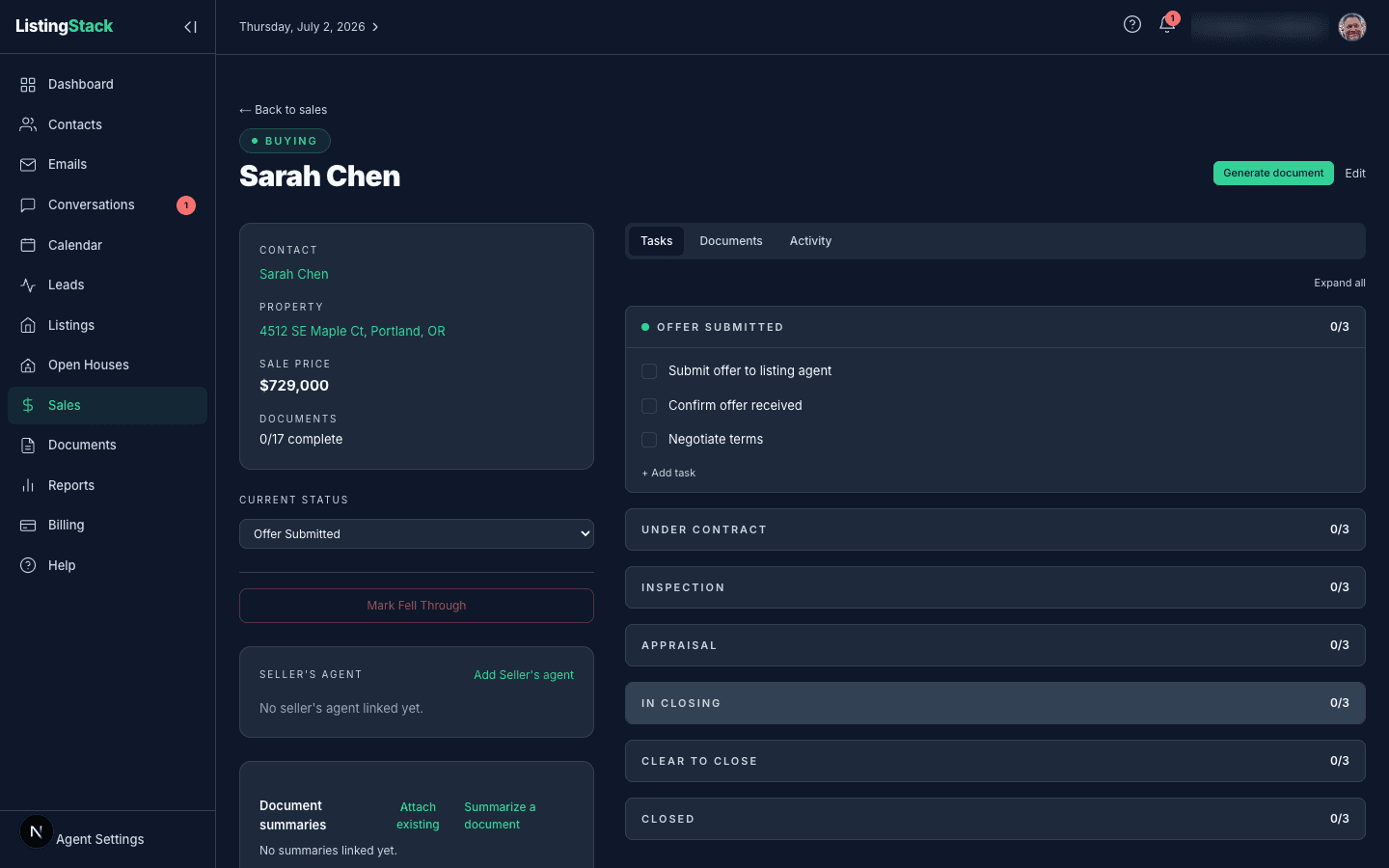
Every sale is seeded with a standard task checklist for its side's stages the moment it's created — things like "Order appraisal" on the buyer side, or "Schedule open house(s)" on the seller side. Tasks live inside their stage; you can add your own, check them off, and remove any non-standard one.
Each incomplete task carries its own deadline, computed backward from the sale's Projected Close Date— reviewing the closing disclosure, for example, is due 3 days before close. Hover a task to reveal its date field and pin a custom deadline instead of the computed one. A sale with no projected close date shows its tasks undated. Completed tasks don't show a deadline.
Incomplete stage tasks don't get their own dashboard card — instead they surface as next-steps in the dashboard's Today stream, tagged Sale, with their due-in-N-days or overdue count carried over, so upcoming and overdue tasks across your sales show up where you start your day. There's no separate reminder or notification for a deadline — the Today stream and the sale page are where you'll see it.
Documents workflow
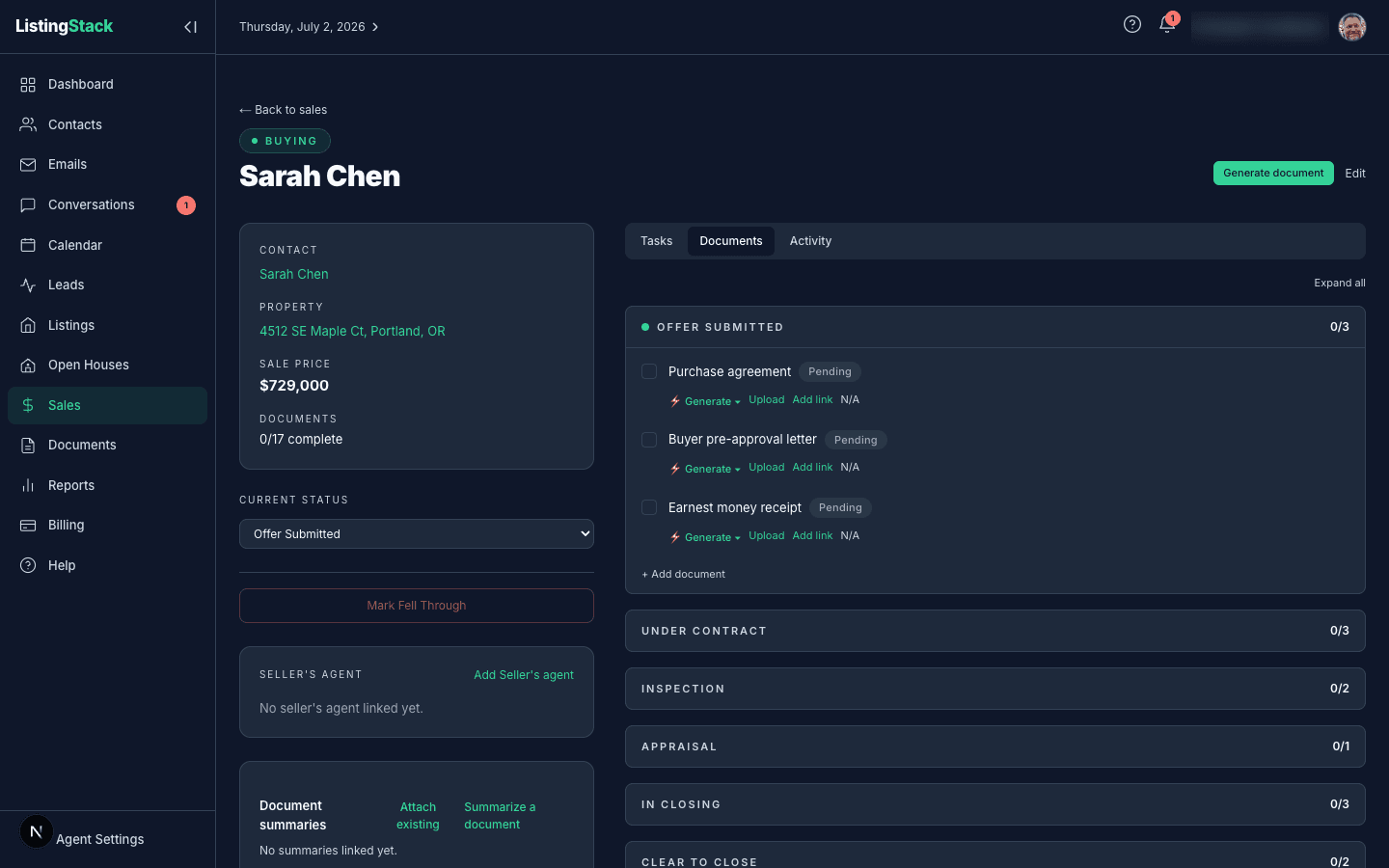
Documents work the same way as tasks — a required-document checklist seeded per stage (purchase agreement, disclosures, inspection report, closing disclosure, and so on, with a different set for buyer vs. seller). Each document moves through its own lifecycle: Generate a fillable draft (from a designated template, the library, a new template from an AI-read sample, or one from scratch — picking a library template sets it as the new designated default), Upload the executed version (uploading again keeps prior versions under History, each downloadable or deletable), Add link instead of a file, or Summarize an uploaded version for a one-click AI summary. A document completes once it has an upload or link, or you can mark it N/A. Non-system documents you added by hand can be removed entirely.
A still-pending document carries the same kind of deadlineas a task, computed from the projected close date (or a custom date you pin instead) — once it's uploaded, linked, or marked N/A, the deadline stops showing. Pending documents from the sale's current stage or any earlier stage also surface in the dashboard's Today stream, tagged Doc, with the same due-in/overdue count — you can adjust a document's due date right from there, but completing it (upload, link, or N/A) still happens on the sale page.
Saved forms, summaries, and connected agent
Every fillable draft you generate for a sale shows up in its Saved forms card, grouped by template — reopen, duplicate, rename, delete, or send it to the client (see the Documents page of this guide for what sending does). The Document summaries card lists AI summaries attached to the sale, with a one-click link to summarize a new upload or attach one made elsewhere.
A sale can also link the agent on the other side of the transaction — labeled Seller's agent on a buyer-side sale, or Buyer's agent on a seller-side sale. Search your contacts or create a new one on the spot; more than one can be linked if needed.
Vendors
Every sale's detail page has a Vendorscard for linking the contacts working the transaction with you — inspector, lender, title company, and anyone else worth keeping on the file. Add a contact from the card or remove one just as easily; they're specific to this sale, not shared across every deal for that contact.
Commission
Commission %is set right on the New Sale form, and it's not locked in after that — Editlets you change it anytime, before or after closing. It shows as a dollar figure on the sale itself (percentage × sale price) and as its own Commission column on the Sales list.
Closing a sale
When the transaction closes, set the status to Closed and fill in the Sale Price and Actual Close Date(closing auto-fills today's date if you leave it blank). Those numbers feed the dashboard's Sales closed YTDcard, which totals count and estimated commission (sale price × commission %).
If a transaction doesn't make it to close, set the status to fell_through instead — it drops out of active pipeline totals but stays in your history.