AI Lead Concierge.
How the concierge replies to your leads, and how you stay in control.
The AI Lead Concierge answers new leads by email before you get a chance to, then keeps the conversation going — asking a light qualifying question, following up if a lead goes quiet, and flagging you the moment it needs a human. Everything it sends and receives shows up here, on the Conversations page.
What the concierge does
The concierge works over email only— there's no SMS anywhere in ListingStack. It's live today for two lead sources: forms on your ListingStack public site, and open-house sign-ins. The moment one of those comes in, it drafts a short, warm reply in your voice — using your name, brokerage, and signature — and either sends it or saves it as a draft for you, depending on your settings below.
That first reply asks one light qualifying question (timeline, must-haves, or whether the lead is already working with an agent). As replies come back, the concierge keeps answering — but it won't invent facts. If a lead asks something it can't verify (price firmness, HOA fees, square footage, school district, showing times, and similar), it tells the lead it'll confirm and get back to them, and flags the question for you instead of guessing.
If a lead goes quiet, a nurture cadence follows up automatically — low-pressure, one gentle check-in at a time, spaced 1, 3, 7, 14, and then 30 days apart. After five nudges with no reply, the conversation closes on its own. At most one automatic message goes out per conversation every 24 hours, so a lead never gets stacked with follow-ups. Whenever a lead replies and the AI answers, the cadence restarts from the top: an engaged lead who goes quiet again gets a fresh round of check-ins, and the conversation shows exactly when the next follow-up is scheduled.
A conversation that stays silent with no follow-up scheduled (for example, after an appointment was booked) closes automatically after 60 days of inactivity. If the contact is in one of your drip segments and still subscribed, the closed conversation notes that they keep receiving your regular drip emails, so going quiet with the concierge never drops them out of your marketing.
The Conversations page
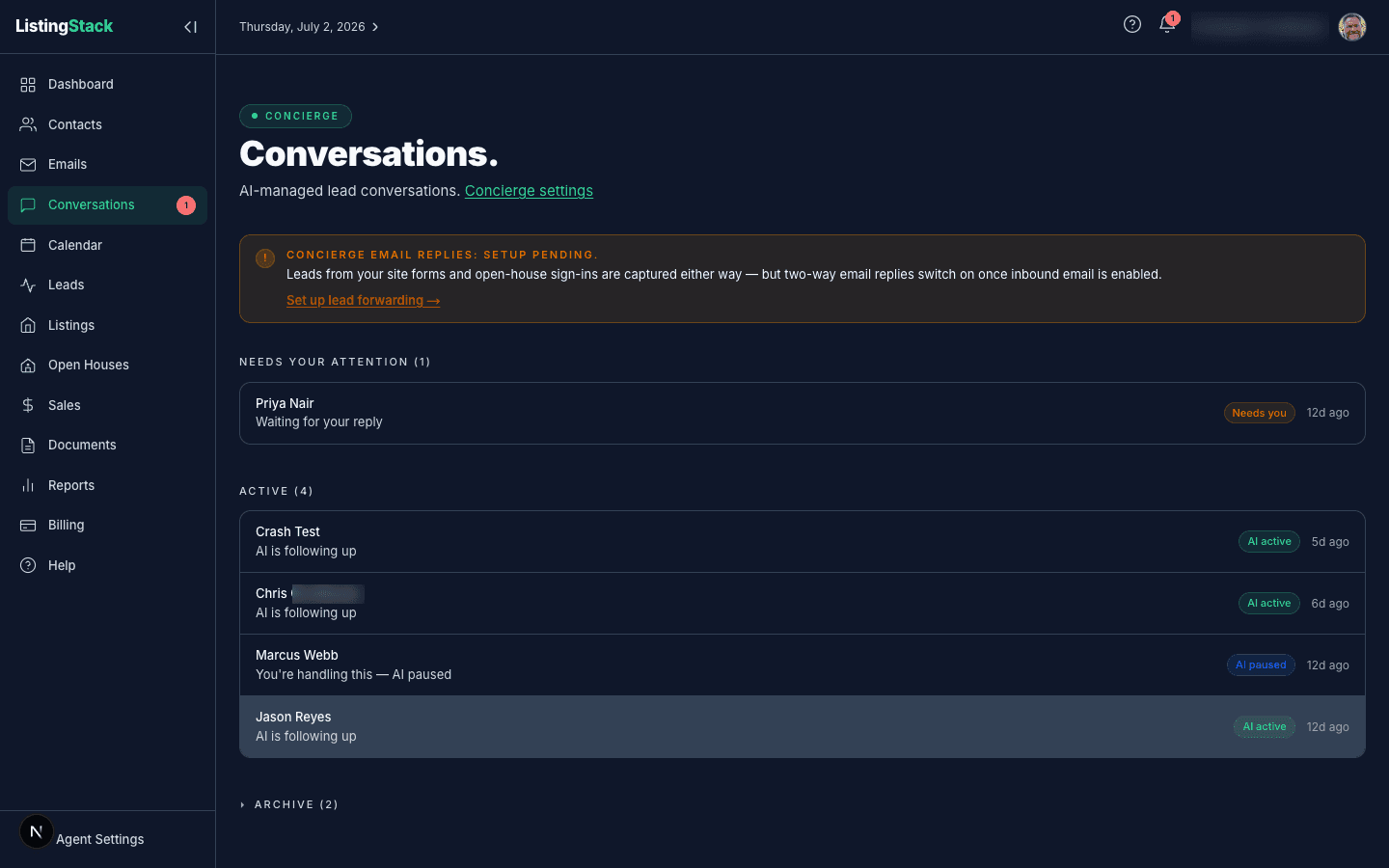
The list is split into three sections:
- Needs your attention — the AI is waiting on you: a draft needs approval, a fact needs confirming, or it handed the conversation off.
- Active— the AI is following up on its own, plus anything you've taken over and are handling yourself.
- Archived — closed conversations (you archived it, the lead unsubscribed or opted out, or the nurture sequence ran its course with no response).
Reading and replying to a conversation
Open a conversation to see the full thread. If the AI is waiting on a fact only you can confirm, a banner at the top shows the exact question it needs answered — click Answerto pre-fill a reply. You can also just type in the reply box at the bottom at any time; sending a reply yourself clears the "needs your attention" state and hands the conversation back to active.
The sidebar has three controls: Pause AI stops the concierge from replying automatically so you can take the conversation over by hand; Resume AI hands it back; Archive closes it out. A paused conversation stays paused until you resume it.
Settings
Concierge settings has two toggles:
- AI writes replies— turns the whole concierge off. When off, the AI won't reply to inbound messages or send nurture nudges, but conversations are still recorded.
- AI sends replies automatically — on by default, meaning the AI sends safe replies on its own. Turn it off and every AI-generated reply is saved as a draft in the conversation instead of going out, waiting in Needs your attention until you approve it.
Setup pending: two-way replies
Leads from your site forms and open-house sign-ins are captured and get an instant reply either way. But reading a lead's replyback requires inbound email, which isn't on by default. Until it's enabled for your workspace, the Conversations page shows a setup-pending banner, and forwarded leads from portal emails (Zillow, Realtor.com, etc.) can't be ingested yet either — see Lead forwarding for that setup, which is gated the same way. Once inbound email is enabled, two-way replies switch on automatically.
Scheduling
When a lead wants to book a showing or a call, the concierge can offer real open times — it checks your connected calendar's busy intervals and only proposes slots that are actually free, spread across the next few days. If a lead names a day, it'll try to offer times on that day specifically before falling back to its usual spread.
Unsubscribe and compliance
Every automated concierge email — instant replies and nurture nudges — carries an unsubscribe link in the footer plus one-click unsubscribe headers, so a lead can opt out without ever having to reply. Once a lead unsubscribes, its nurture cadence stops for good and the conversation closes — no more scheduled check-ins. But if that lead later emails you directly, the concierge still replies: it answers the question in front of it, with no marketing or calls-to-action, and doesn't re-enroll them in nurture. Manual replies you send yourself from the composer don't carry the automated footer at all — that's treated as your own correspondence.