Email Marketing.
Drip campaigns, opt-in, ad-hoc emails, subscribers, and signature.
ListingStack's email system has three distinct pieces: drip campaigns (recurring marketing to subscribed contacts), opt-in emails (the double opt-in you send before adding anyone to drip), and personal response emails (one-off sends from a contact, a lead, a document template, or a document send). Each has its own style and its own controls.
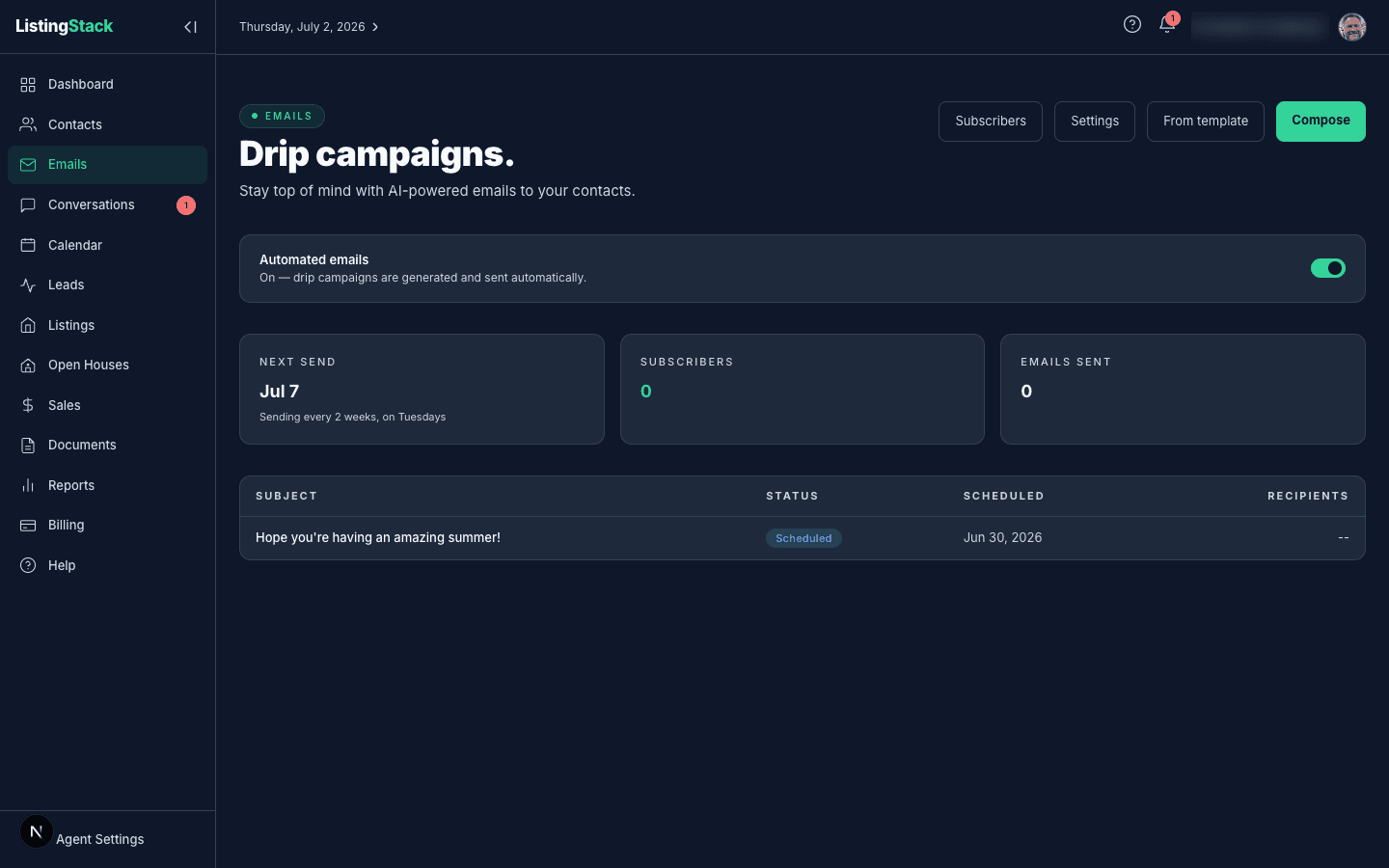
Drip campaigns
Drip emails are the recurring touch-base emails that go to every confirmed subscriber on a schedule you pick. The content is AI-generated by default — you set the frequency and send day, ListingStack writes a warm personal email, you review and approve (or let auto-send handle it).
Drip configuration lives in Email settings:
- Auto-generate — if you haven't composed by the scheduled date, ListingStack generates one for you
- Auto-enroll all new leads — every new contact with an email gets an opt-in invite, not just past clients and sphere
- Frequency — every 1, 2, 3, 4, 6, 8, or 10 weeks
- Send day + time — what day of the week, what hour (in PST)
- From name — the display name on the "From" field; blank falls back to your profile name
On the Campaigns tab, every field saves itself as you change it, no Save button required (the separate Greetingstab still saves on a button). A "Settings saved" toast confirms the write; a failed save shows a red error toast plus an inline Retry.
Personalization
The AI uses a {{first_name}}placeholder in the greeting. At send time, it's substituted per recipient — so "Hey {{first_name}}!" becomes "Hey Sarah!" in Sarah's inbox. Contacts without a first name fall back to "there" ("Hey there!").
Branded header + footer
Drip and opt-in emails include a branded header (your photo in a circle with your name below, clickable to your public site) and a footer with a link back to your site, the "Sent by X via ListingStack" attribution, an unsubscribe link, and — once you've set it (see the one-time setup below) — your brokerage mailing address, which commercial email is required to carry. Buyer prep emails (see Buyer Profiles & Surveys) carry the same address-and-unsubscribe footer.
Composing an email
From Emails, click Compose to reach /emails/compose, which has three tabs:
AI email
Give the AI a topic prompt — a recent experience, a market observation, a personal story — and click Generate Email. You can edit the subject line and regenerate as many times as you like; the preview shows exactly what subscribers will see, along with how many confirmed subscribers the send will reach. When you're happy with it, either Approve & Schedule (goes out at your next scheduled send) or Send Now.
Custom email
Write your own subject and body instead of generating one, with a {{first_name}} greeting pre-filled to personalize. Choose who receives it: a single contact, all confirmed subscribers, or a segment by tag or contact type — the page shows a live recipient count as you narrow the audience. Single-contact sends go out immediately as one-to-one email; audience sends can be approved for your next scheduled slot or sent now, same as an AI email.
From template
Pick one of your saved document templates and a contact to send it to — optionally tying the send to a listing or sale, which auto-fills the contact for you. This hands off to the document's own send flow rather than the drip pipeline.
Subscribers
Subscribers lives on its own page with search, a status filter (Subscribed / Pending / Unsubscribed / All), and pagination.
- Send opt-in to all contacts — bulk-invite every contact who has an email and isn't already in the system
- Remove per row — deletes the subscription record entirely; unsubscribed contacts aren't re-invited.
The double opt-in is a real double opt-in: you send an invite, they have to click the confirm link in the email before they're added to drip. This protects your sender reputation and keeps open rates honest.
Daily send limit
Opt-in invites, drip newsletters, and birthday/anniversary greetings (the Greetingstab in Email settings) all draw from one shared daily send limit, not separate ones — a heavy day of opt-in invites leaves less room for that day's drip and greeting sends, and vice versa.
The limit isn't fixed. It ramps with how much mail your account has actually delivered (total sent minus hard bounces): new accounts start at 50/day, move up to 100/day once you've delivered 200 emails, and reach 200/dayat 1,000 delivered. There's nothing to configure — it climbs automatically as your list proves it delivers cleanly.
The limit resets once a day (midnight UTC — late afternoon or evening in the US, depending on your time zone). Anything sent beyond it isn't lost: it's queued and goes out automatically as capacity frees up, at your current daily rate. Invite a large batch of contacts at once and expect the excess to trickle out over the following days rather than all at once.
This exists to protect your sender reputation: mailbox providers watch sending volume closely, and a new account blasting thousands of emails on day one is a fast way to land in spam. Pacing keeps your mail landing in inboxes.
Client appointment remindersdon't draw from this limit. They're transactional, tied to a specific appointment, so they always go out on schedule, even to a contact who has unsubscribed from your marketing emails.
New listings in issues. Each audience group on the Compose page has an Include new listings in this group's emailsswitch. When it's on, any listing you've switched on (Include in drip emails, on the listing) is added to that group's next issue as a card below the written email, once per group, up to 6 per issue, whether the issue goes out on its schedule or you use Send now. The written part of the issue is unchanged; the cards come straight from the listing's details. On the issue's page, a draft or scheduled issue shows which listings will be included, an issue that's part-way through sending shows which ones are still going out, and a sent issue shows which ones went out.
Personal response emails (ad-hoc)
Click a contact's email address — on a contact page, a lead page, or in the contacts list — to open an in-app compose modal. It opens with a From choice: send as your ListingStack address (logged in ListingStack, replies come back into ListingStack, open-tracked, and Concierge-eligible for orgs with the AI Lead Concierge) or as your own email address (hands off to your mail app; nothing is logged and replies stay in your personal inbox). Either way the email itself is plain — no drip branding, no unsubscribe — because these are one-to-one correspondence. See Leads for the full flow.
One-time setup on your first send
The first time you send an in-app email (a lead or contact compose, a buyer-survey email, the mortgage-ready guide), a short setup prompt collects whatever is still missing of your signature text and your brokerage mailing address. Fill them in and the send continues — once both are set, you aren't asked again. The address is what appears in the footer of your commercial email (drip campaigns, opt-in invites, and buyer prep emails); afterward, the signature text stays editable in Email settings, while the brokerage address lives on Profile→ Brokerage.
Signature block
Personal emails — the ones you send from a contact, a lead, a document template, or a document send — get a compact signature at the bottom: small circular photo, your name, a "View my site →" link. You can customize this in Email settings:
- Include signature block — off entirely if you want no branding
- Custom signature text — optional free-form text appended below the block (phone, license number, brokerage, anything)